AssetPack 1.0.0 发布!

今天我们非常高兴地宣布 AssetPack 1.0,一款面向网页开发者的资源管理和优化工具。
🌐 Today we are very excited to announce AssetPack 1.0, an asset management and optimization tool for web developers.
在网页开发的世界中,管理和优化资源通常需要大量的人工操作。开发者需要确保他们的图片被压缩,音频文件被优化,字体被高效加载,等等。这个过程可能耗时且容易出错,尤其是在处理包含许多资源的大型项目时。为了解决这一挑战,AssetPack 提供了一个可配置的资源管道,可以自动化执行许多这些任务,从而让开发者更容易管理和部署项目中的资源。
🌐 In the world of web development, managing and optimizing assets often demands significant manual effort. Developers need to ensure that their images are compressed, their audio files are optimized, their fonts are loaded efficiently, and more. This process can be time-consuming and error-prone, especially when working on large projects with many assets. To address this challenge, AssetPack provides a configurable asset pipeline that automates many of these tasks, making it easier for developers to manage and deploy assets in their projects.
什么是资源包?
🌐 What is AssetPack?
AssetPack 是一个旨在简化 Web 项目中资源管理、优化和部署的工具。它与框架无关,可以与你喜欢的任何框架一起使用,例如 PixiJS、Three.js、Phaser 等。AssetPack 采用基于插件的系统,允许你创建自己的插件,根据需要自定义资源处理。
🌐 AssetPack is a tool designed to streamline the management, optimization, and deployment of assets in web projects. It is framework-agnostic and can be used with any framework you like, such as PixiJS, Three.js, Phaser, and others. AssetPack employs a plugin-based system, allowing you to create your own plugins to customize asset processing according to your needs.
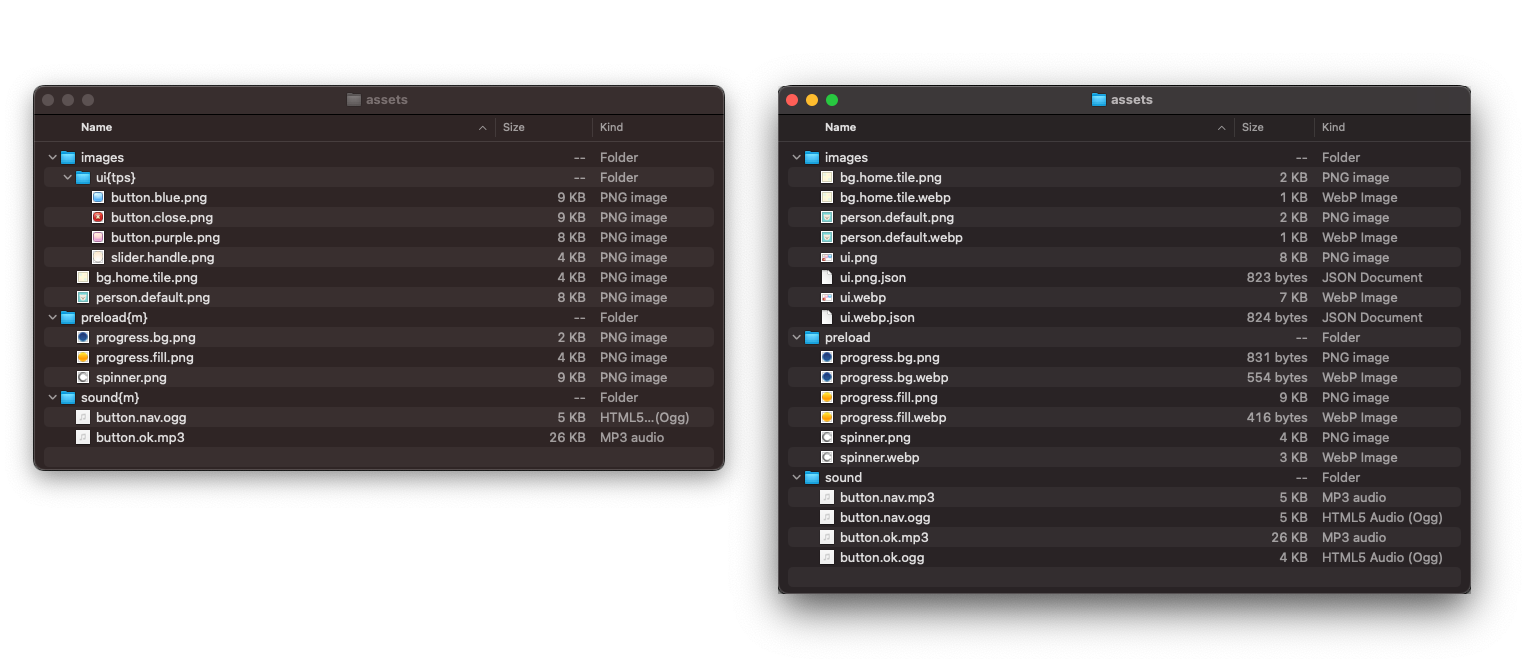
AssetPack 开箱即用自带以下插件:
🌐 AssetPack comes out of the box with the following plugins:
- 缓存破坏:自动将唯一哈希附加到资源 URL,以确保客户端始终加载资源的最新版本。
- 压缩:使用 sharp 压缩图片,允许创建 webp/avif 图片并压缩 png/jpg 以减小文件大小。
- TexturePacker:自动从图片生成精灵图。
- Mipmap:为纹理生成多级渐远纹理以提高渲染性能,例如 2x、1x、0.5x 等。
- 骨骼:通过为
.atlas文件创建多级纹理优化 Spine 动画。 - 音频/FFmpeg:使用 FFmpeg 将音频文件转换为所需的格式和比特率。
- JSON:压缩 JSON 文件以减小其大小。
- Webfont:将所有字体文件转换为 WOFF2 格式,并提供用于 SDF 和 MSDF 字体生成的插件
- 清单:生成一个包含所有资源 URL 的清单文件以便于加载。可与 PixiJS 的
Assets加载器一起使用
上述插件只是AssetPack功能的一些示例。你可以创建自己的插件以进一步扩展AssetPack的功能。
🌐 The above plugins are just a few examples of what AssetPack can do. You can create your own plugins to extend AssetPack's functionality further.
AssetPack 的主要功能
🌐 Key Features of AssetPack
缓存与持续集成
🌐 Caching & CI
AssetPack 智能缓存资源,每个资源只转换一次。这减少了重复处理并加快了构建时间,确保你始终拥有最新版本的资源而不会产生不必要的开销。
🌐 AssetPack intelligently caches assets, transforming each asset only once. This reduces redundant processing and speeds up build times, ensuring that you always have the latest version of your assets without unnecessary overhead.
这对于持续集成(CI)环境非常完美,AssetPack 允许你将原始资源提交到你的仓库,并在构建过程中进行转换。这确保了你的资源始终经过优化并保持最新状态,同时所需的手动干预最少。更多信息请查看 Github Action 示例 这里。
🌐 This is perfect for Continuous Integration (CI) environments, AssetPack allows you to commit raw assets to your repository and transform them as part of your build process. This ensures that your assets are always optimized and up-to-date with minimal manual intervention. See the Github Action example here for more information.
性能
🌐 Performance
AssetPack 旨在处理大量资源,利用最快的工具。这确保了你的资源管道能够跟上现代网页开发的需求,快速高效地交付优化的资源。
🌐 Designed to handle large quantities of assets, AssetPack utilizes the fastest tools available. This ensures that your asset pipeline can keep up with the demands of modern web development, delivering optimized assets quickly and efficiently.
观看模式
🌐 Watch Mode
使用 Watch 模式,AssetPack 可以实时监控你的资源,并在你添加或删除文件时更新它们。这一实时更新功能简化了开发流程,使你无需手动触发资源处理即可立即看到更改。结合缓存系统,Watch 模式确保仅转换必要的资源,从而将构建时间保持在最低。
🌐 With the Watch mode, AssetPack monitors your assets in real-time, updating them as you add or remove files. This live update feature streamlines development, allowing you to see changes immediately without having to manually trigger asset processing. Combined with the caching system, Watch mode ensures that only the necessary assets are transformed, keeping build times to a minimum.
标签系统
🌐 Tag System
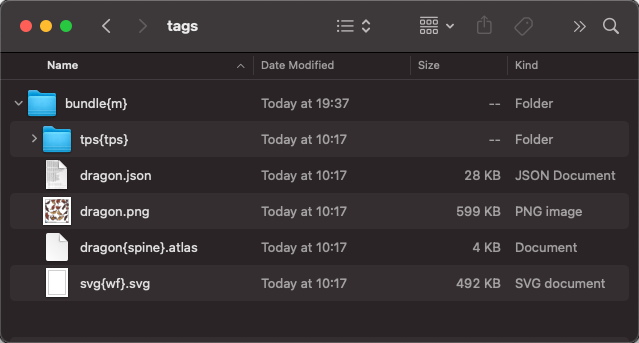
AssetPack 的基于标签的系统使资源管理直观且灵活。只需向文件夹或文件添加标签(例如,添加 {tps} 来创建精灵图集),即可轻松应用特定的处理规则。此功能简化了复杂的资源工作流程并增强了自定义功能。
🌐 AssetPack's tag-powered system makes asset management intuitive and flexible. By simply adding tags to folders or files (e.g., {tps} to create a sprite sheet), you can easily apply specific processing rules. This feature simplifies complex asset workflows and enhances customization.
如何使用资源包
🌐 How to use AssetPack
安装
🌐 Installation
要安装 AssetPack,你需要安装 @assetpack/core 软件包。
🌐 To install AssetPack, you need to install the @assetpack/core package.
npm install --save-dev @assetpack/core
AssetPack requires Node.js version 20+, please upgrade if your package manager warns about it.
设置
🌐 Setup
要设置 AssetPack,你需要创建一个配置文件,该文件定义了你想要优化的资源以及你希望如何优化它们。
🌐 To set up AssetPack, you need to create a configuration file that defines what assets you want to optimise and how you want to optimise them.
首先在项目的根目录中创建一个 .assetpack.js 文件。该文件应导出一个具有以下属性的对象:
🌐 First create a .assetpack.js file in the root of your project. This file should export an object with the following properties:
// .assetpack.js
import { pixiPipes } from '@assetpack/core';

export default {
  entry: './raw-assets',
  output: './public/assets',
  pipes: [
    /* If you are using AssetPack with PixiJS, you can use the `pixiPipes` function
     * to add a pre-configured set of plugins, with an opinionated
     * set of defaults for PixiJS.
     */
    ...pixiPipes(),
  ],
};
要查看完整的配置选项列表,请参阅 API参考 页面。
🌐 To see the full list of configuration options, see the API Reference page.
然后要运行 AssetPack,你可以使用命令行接口、通过编程方式运行,或者使用像 Vite 这样的构建工具。
🌐 Then to run AssetPack, you can use the CLI, run programmatically, or use a build tool like Vite.
AssetPack 有许多内置插件供你使用,要查看插件的完整列表,请参见 Plugins 页面。
🌐 AssetPack has a number of built-in plugins for you to use, to see the full list of plugins, see the Plugins page.
开源游戏
🌐 Open Source Games
AssetPack 已经在我们的开源游戏仓库中使用。查看使用 AssetPack 进行资源管理的 游戏。这些示例展示了 AssetPack 在实际场景中的强大功能和灵活性。
🌐 AssetPack is already in use in our open source games repo. Check out the games leveraging AssetPack for asset management. These examples showcase the power and flexibility of AssetPack in real-world scenarios.
结论
🌐 Conclusion
AssetPack 是一个强大的工具,可以帮助你管理和优化网页项目中的资源。通过自动化涉及资源管理的许多任务,AssetPack 可以为你节省时间和精力,让你专注于构建出色的网页体验。我们希望你在项目中觉得 AssetPack 有用,并期待看到你用它创造出的作品!
🌐 AssetPack is a powerful tool that can help you manage and optimize assets in your web projects. By automating many of the tasks involved in asset management, AssetPack can save you time and effort, allowing you to focus on building great web experiences. We hope you find AssetPack useful in your projects, and we look forward to seeing what you create with it!
我们致力于不断改进 AssetPack,你的反馈对我们非常宝贵。如果你遇到任何问题或有新的功能建议,请在我们的 Discord 上联系我们或在我们的 GitHub 仓库中提交问题。
🌐 We are committed to continuously improving AssetPack, and your feedback is invaluable to us. If you encounter any issues or have suggestions for new features, please reach out on our discord or open an issue on our GitHub repository.
🌐 保持联系
🌐 🌐 Stay Connected
在社交媒体上关注 Zyie 和 PixiJS 以获取最新动态。加入我们的 Discord 活跃社区,参与实时讨论和获取支持。
🌐 Follow Zyie and PixiJS on social media for the latest updates. Join our vibrant community on Discord for real-time discussions and support.