PixiJS 更新 - v8.11.0

PixiJS v8.11.0 引入了强大的新文本工具,用于创建高级动画,并进行了一些提升使用体验的改进。以下是新增内容:
🌐 PixiJS v8.11.0 introduces powerful new text tools for creating advanced animations and several quality-of-life improvements. Here's what's new:
- SplitText & SplitBitmapText: 将文本拆分为行、单词和字符,以实现精细控制和高级动画
- 容器的新
origin属性: 在不影响位置的情况下围绕定义点旋转和缩放 replaceChild方法: 在保持变换的同时无缝切换显示对象- 位图文本换行:
breakWords现在可以与BitmapText一起使用,以实现更好的布局控制 - llms.txt 支持: 我们已为
llms.txt标准添加官方支持,以帮助 AI 工具发现并遵守 PixiJS v8 内容。 - PixiJS 展示: 提交你的项目并在我们的新社区图库中展示
- 赞助更新: 我们现在已在 GitHub Sponsors 上上线,并提供了全新和改进的赞助等级
让我们深入了解细节。
🌐 Let's dive into the details.
SplitText 和 SplitBitmapText
🌐 SplitText & SplitBitmapText
此功能处于实验阶段,未来版本可能会有所更改。如果你遇到任何问题,请在我们的GitHub 问题页面上报告。
我们都喜欢动画文本,但直到现在,将文本拆分为单个字符、单词或行一直很麻烦。使用新的 SplitText 和 SplitBitmapText 类,你可以轻松控制任何级别的文本。
🌐 We all love animated text, but until now, breaking text into individual characters, words, or lines was a pain. With the new SplitText and SplitBitmapText classes, you can control text at any level with ease.
你可以:
🌐 You can:
- 使用像 GSAP 这样的补间动画库独立地为每个部分制作动画。
- 为字符、单词和行定义独立的“锚点”。
- 在运行时动态更新文本或样式。
- 拆分现有的
Text或BitmapText。
import { SplitText } from 'pixi.js';

// Create new SplitText instance
const newSplitText = new SplitText({ text: 'Hello Pixi', style: { fontSize: 36 } });

// Split existing Text object
const myText = new Text('Hello Pixi', { fontSize: 36 });
const splitText = SplitText.from(myText);
查看完整示例和使用指南 这里。
提醒:当拆分字符时,浏览器的字距调整会失效,因此间距可能会与标准文本略有不同。这种权衡提供了创意灵活性,但对于像素精确的布局来说,需要注意这一点。
新 container.origin 属性
🌐 New container.origin Property
新的 origin 属性允许你控制容器旋转或缩放的起点,而不会改变其在场景中的位置。
🌐 The new origin property allows you to control where a container rotates or scales from, without shifting its position in the scene.
new Container({ origin: { x: 100, y: 100 } });
new Container({ origin: 50 }); // Same as { x: 50, y: 50 }
为什么不使用 pivot?
当 pivot 改变变换原点时,它也会修改容器的位置,从而使布局和动画逻辑更加复杂。
🌐 While pivot changes the transform origin, it also modifies the container’s position, making layout and animation logic more complex.
origin 属性提供了一种可预测、位置稳定的变换控制替代方案。
🌐 The origin property provides a predictable, position-stable alternative for transform control.
新的 container.replaceChild 方法
🌐 New container.replaceChild Method
这种新方法允许你在容器内将一个显示对象替换为另一个,而新的子对象会继承旧对象的本地变换。这意味着你可以在不丢失其索引、位置、缩放、旋转或其他任何本地变换的情况下替换对象。
🌐 This new method allows you to swap out one display object for another within a container and the new child inherits the local transform of the old one. This means you can replace objects without losing their index, position, scale, rotation, or any other local transforms.
container.replaceChild(oldChild, newChild);
这非常适合用于像将静态文本替换为带有 SplitText 版本的动态效果这样的用例。
🌐 This is perfect for use cases like swapping static text with a SplitText version for dynamic effects.
const myText = new BitmapText({
  text: 'Hello Pixi',
  style: {...},
  scale: 2,
  skew: { x: 0.1, y: 0.2 },
  anchor: { x: 0.5, y: 0.5 },
});
const segmented = SplitBitmapText.from(myText);

// Use the new replaceChild method to swap text
container.replaceChild(myText, segmented);
为位图文字提供更好的断词
🌐 Better Word Breaking for BitmapText
breakWords 选项现在可以与 BitmapText 一起使用。这改善了使用位图字体的项目的布局控制,使管理动态图片文本、标签和用户界面元素更加容易。
🌐 The breakWords option now works with BitmapText. This improves layout control for projects using bitmap fonts, making it easier to manage dynamic text, labels, and UI elements.
llms.txt 支持
🌐 llms.txt Support
我们现在正式支持 llms.txt 规范,以帮助 AI 工具访问准确的 PixiJS 文档。
我们为不同的上下文窗口大小提供了几个文档文件:
🌐 We now officially support the llms.txt convention to help AI tools access accurate PixiJS documentation.
We provide several documentation files for different context window sizes:
| 文件 | 描述 |
|---|---|
/llms.txt | 可用文档文件索引 |
/llms-full.txt | 完整的 API 文档,包括所有类、方法和示例 |
/llms-medium.txt | 为中等上下文窗口的 AI 工具优化的压缩文档 |
这些文件是从我们的 TypeScript 定义和文档源自动生成的。它们每天都会更新,以确保 LLM 和 AI 驱动的工具能够参考最准确、最新的 PixiJS 信息。
🌐 These files are generated automatically from our TypeScript definitions and documentation sources. They update daily to ensure LLMs and AI-powered tools can reference the most accurate, up-to-date PixiJS information.
这有助于编码助手、搜索工具和文档机器人提供正确的建议,并避免使用过时或错误的信息。
🌐 This helps coding assistants, search tools, and documentation bots provide correct suggestions and avoids outdated or incorrect information being used.
PixiJS 展示现已上线
🌐 PixiJS Showcase is Live
我们喜欢看到你们用 PixiJS 制作的作品。新的 PixiJS 展示 展示了社区创作的游戏、网站、应用、工具和实验项目。
🌐 We love seeing what you build with PixiJS. The new PixiJS Showcase highlights games, websites, apps, tools, and experiments created by the community.
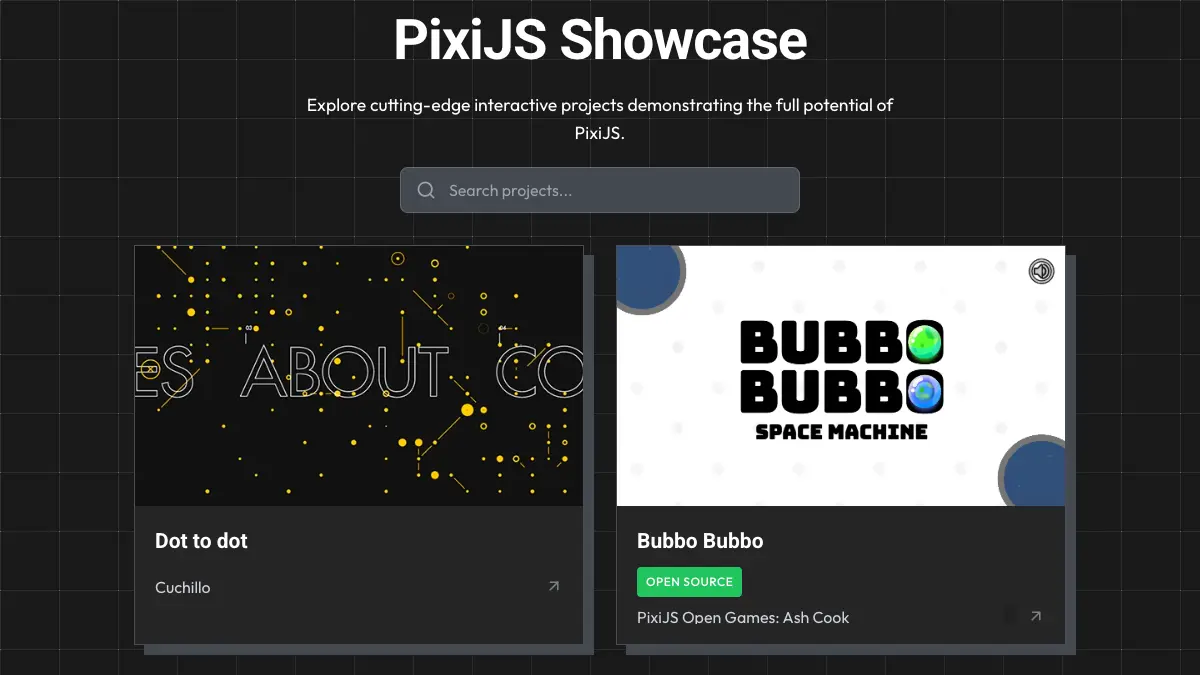
如果你做了什么很酷的东西,我们很乐意展示它。只需填写页面上的提交表格。我们总是对Pixi社区的创意感到惊讶!
🌐 If you've made something cool, we'd love to show it off. Just fill out the submission form on the page. We're always amazed by the creativity of the Pixi community!
赞助更新
🌐 Sponsorship Updates
PixiJS 现在已在 Github Sponsors 上上线,我们已经重新设计了赞助等级,以为我们的支持者提供更多价值和曝光。
🌐 PixiJS is now live on Github Sponsors and we've revamped our sponsorship tiers to provide more value and visibility for our supporters.
我们依靠赞助来维持 PixiJS 的可持续开发,而你的支持帮助我们继续改进库、修复错误并添加新功能。
🌐 We rely on sponsorships to keep PixiJS development sustainable, and your support helps us continue improving the library, fixing bugs, and adding new features.
赞助等级
🌐 Sponsorship Tiers
| 等级 | 每月 | 权益 |
|---|---|---|
| 青铜 | $100 | 在我们的网站上显示你的徽标,并附上你的网站链接 |
| 白银 | $250 | 青铜等级的权益,加上在发布博客文章中显示徽标,以及在展示页面中的赞助链接 |
| 黄金 | $500 | 白银等级的权益,加上在所有文档页面和 GitHub README 中显示徽标 |
| 黄金++ | $1000 | 黄金等级的权益,加上在展示页面中两个赞助链接和优先处理的错误修复 |
| 铂金 | $2000 | 黄金++等级的权益,加上最显眼的徽标位置、最高优先级的错误修复和路线图意见 |
你可以在我们的赞助商页面上找到所有详细信息。
🌐 You can find all the details on our Sponsors page.
结论
🌐 Conclusion
PixiJS 8.11.0 为构建交互式内容带来了微妙但强大的改进,包括分段文本动画、更好的布局工具以及改进的生态系统支持。
🌐 PixiJS 8.11.0 adds subtle but powerful improvements for building interactive content, including segmented text animations, better layout tools, and improved ecosystem support.
我们很期待看到你接下来会创造什么,更期待能与大家一起构建 PixiJS。
🌐 We're excited to see what you build next, and even more excited to build PixiJS with all of you.
创作愉快! PixiJS 团队
🌐 Happy creating! The PixiJS Team